For Parents
Guide: What Parents Need to Know About the Reler App
Reler is designed to help high school students safely expand their social circles. We know that trust matters, especially when it comes to online communities, so we've provided a clear breakdown of how Reler works and the steps we take to keep users safe.
3 minute read — by Van Druce
The Issue We’re Addressing
The Issue We’re Addressing
A growing number of high school students feel disconnected from their peers — even when surrounded by people every day.
In Utah’s SHARP student survey, about one in four high school students reported feeling isolated from others “often” or “always”
This isn’t because they don’t want connection.
We believe it is due to the limited number of like-minded social options available within the confined social pool of a single school.
A growing number of high school students feel disconnected from their peers — even when surrounded by people every day.
In Utah’s SHARP student survey, about 1 in 4 high school students reported feeling isolated from others “often” or “always”
This isn’t because they don’t want connection.
It’s because of how modern digital life shapes social circles.

Our Approach
Our Approach
Start With Safety
Mandatory age verification before access, various school verification mechanisms, in-app safety reminders, safety-led product decisions, and more.
Widen The Pool (but close by)
Students can discover peers from nearby schools, not the entire internet — widening their social circle without removing context or accountability.
Efficient, Low-Pressure Interface
Reler uses a simple card-based introduction flow.
There’s no posting, no feeds, no messaging, no pressure to perform.
Shared Interests Matter
Users can use their profile photos & bio to highlight genuine interests, so students can connect based on real overlap.
On Their Terms
There are no private DMs on Reler.
If two students want to connect, they choose when to move the conversation to the platforms they already use.
Start With Safety
Mandatory age verification before access, various school verification mechanisms, in-app safety reminders, safety-led product decisions, and more.
Widen The Pool (but close by)
Students can discover peers from nearby schools, not the entire internet — widening their social circle without removing context or accountability.
Efficient, Low-Pressure Interface
Reler uses a simple card-based introduction flow.
There’s no posting, no feeds, no messaging, no pressure to perform.
Shared Interests Matter
Users can use their bio, select interests, or showcase their favorite song to highlight genuine interests, so students can connect based on real overlap.
On Their Terms
There are no DMs on Reler.
If two students want to connect further, they choose if and when to add each other off-platform. Reler does not include private direct messaging.

How We Keep Users Safe
How We Keep Users Safe
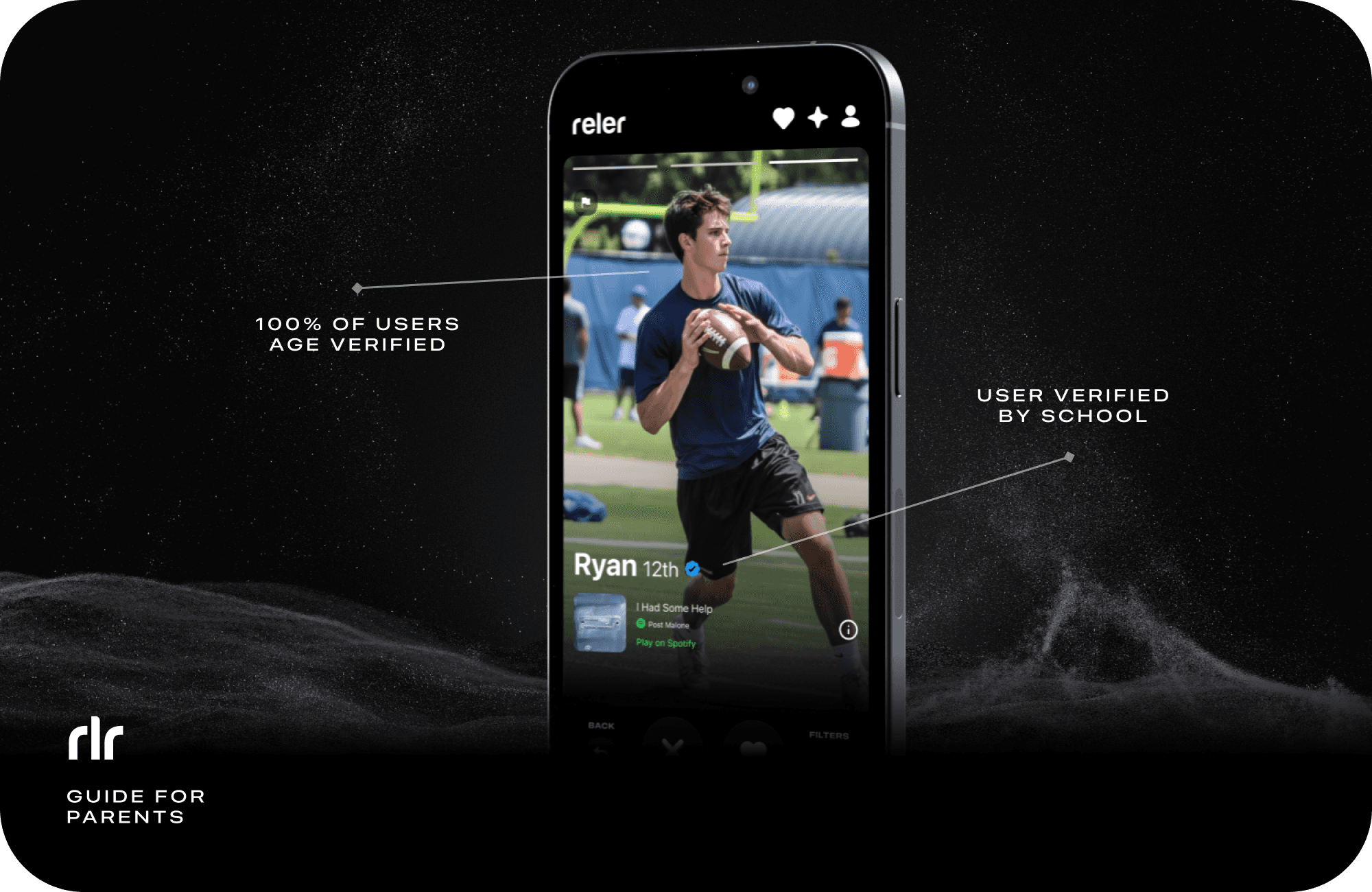
100% User Age Verification
Before anyone can use Reler, they must pass AI-Based Age Verification powered by Yoti — the same age verification system used by Instagram and Facebook. It is just a selfie, the image is not stored, and not able to identify the user personally. Read more about Yoti here.
School Verification (peer-to-peer checkmark)
Users can verify peers from their school using unique multi-digit codes. When a user enters a peer's code, we cross-check their school data, and if they match, both users receive one (1) Friend Verification each. Users can verify with up to five (5) peers. The Verified Checkmark is intended to add an extra layer of trust. It means the user has been confirmed by real-life peers in the app — not just by a system.
School Verification (school-issued email)
Soon-to-be mandatory school verification measure, utilizing school-issued email addresses and authentication codes. Currently in development and estimated to arrive in 2026.
No Private Messaging
Reler doesn’t have private DMs.
Instead, you can choose to add someone on social media only when you want to.
Content Moderation on Uploads
Photos and bios are reviewed upon upload using Google's Vision AI moderation technology.
If something isn’t okay, it's blocked — repeated blocks result in an account flag that is then reviewed by our Trust & Safety team.
Safety Reminders In The Product
We show in-app popups to remind users how to use the app safely, and to encourage them to use available safety tools — such as our Report button — if needed.
User Report System
Users can report a profile in just two taps, from both the card stack and the connections page.
U.S. Human Moderation
Our Trust & Safety team reviews reports and flagged profiles promptly and takes action as appropriate.
100% User Age Verification
Before anyone can use Reler, they must pass AI-Based Age Verification powered by Yoti — the same age verification system used by Instagram and Facebook. It is just a selfie, the image is not stored, and not able to identify the user personally. Read more about Yoti here.
School Verification (peer-to-peer checkmark)
Users can verify peers from their school using unique multi-digit codes. When a user enters a peer's code, we cross-check their school data, and if they match, both users receive one (1) Friend Verification each. Users can verify with up to five (5) peers. The Verified Checkmark is intended to add an extra layer of trust. It means the user has been confirmed by real-life peers in the app — not just by a system.
School Verification (school-issued email)
Soon-to-be mandatory school verification measure, utilizing school-issued email addresses and authentication codes. Currently in development and estimated to arrive in 2026.
No Private Messaging
Reler doesn’t have private DMs.
Instead, you can choose to add someone on social media only when you want to.
Content Moderation on Uploads
Photos and bios are reviewed upon upload using Google's Vision AI moderation technology.
If something isn’t okay, it's blocked — repeated blocks result in an account flag that is then reviewed by our Trust & Safety team.
Safety Reminders In The Product
We show in-app popups to remind users how to use the app safely, and to encourage them to use available safety tools — such as our Report button — if needed.
User Report System
Users can report a profile in just two taps, from both the card stack and the connections page.
U.S. Human Moderation
Our Trust & Safety team reviews reports and flagged profiles promptly and takes action as appropriate.

Our Roots
Our Roots
Reler was started in a high school classroom. What began as a sketch on lined paper in an English class in Utah has grown into a purpose-built friend introduction product, now available for all American high schools.

Coming soon — we are in the early stages of assembling a board of accredited safety experts to help guide and strengthen our safety strategy.
Safety Board
Safety Board
Coming soon — we are in the early stages of assembling a board of accredited safety experts to help guide and strengthen our safety strategy.

Questions or Concerns?
Questions or Concerns?
If you have any questions or concerns, please feel free to contact us at: team@reler.app

If you have any questions or concerns, please feel free to contact us at: team@reler.app